
Most service businesses are sitting on a list of people who once raised their hand. They asked for a quote, called about a job, or booked and never showed. Then nobody followed up, and they went quiet.
You’ve already paid to get those people. Database reactivation is the process of going back to them, finding out who still needs help, and booking them. Here’s how it works, step by step.
Want it done for you? Our database reactivation service handles the list cleanup, messaging, AI replies and booking for you.
What Is Database Reactivation?
Database reactivation is a planned outreach campaign to the dormant contacts already in your CRM or customer list, such as old leads, unaccepted estimates and past customers, to restart the conversation and book new appointments or jobs. It usually runs by text message first, with email and phone or AI follow-up.
It is not cold outreach. You’re contacting people who already know your business and gave you their information, so a relevant, honest message lands very differently than one to strangers.
Who is in “the database”?
Your reactivation list might include:
- Web form and ad leads who never booked
- Estimates or quotes that were never accepted
- Missed callers who never got a callback
- No-shows and canceled appointments
- Past customers who haven’t been back in a while (for example, overdue for maintenance or a follow-up visit)
Database reactivation vs. lead reactivation vs. nurture
Lead reactivation usually means re-engaging leads who never became customers. Database reactivation also includes past customers. Nurture is slow, ongoing contact, like a monthly email. A reactivation campaign is a short, focused push, after which anyone not ready moves back into nurture.
Why Database Reactivation Is Worth Doing
You already paid for these leads through ads, referrals and staff time, and timing changes: “not right now” six months ago can be “yes, this week” today. It isn’t magic, though. Results depend on how clean your list is, whether you have permission to contact people, how relevant your message is, and how fast you respond.
How a Database Reactivation Campaign Works, Step by Step
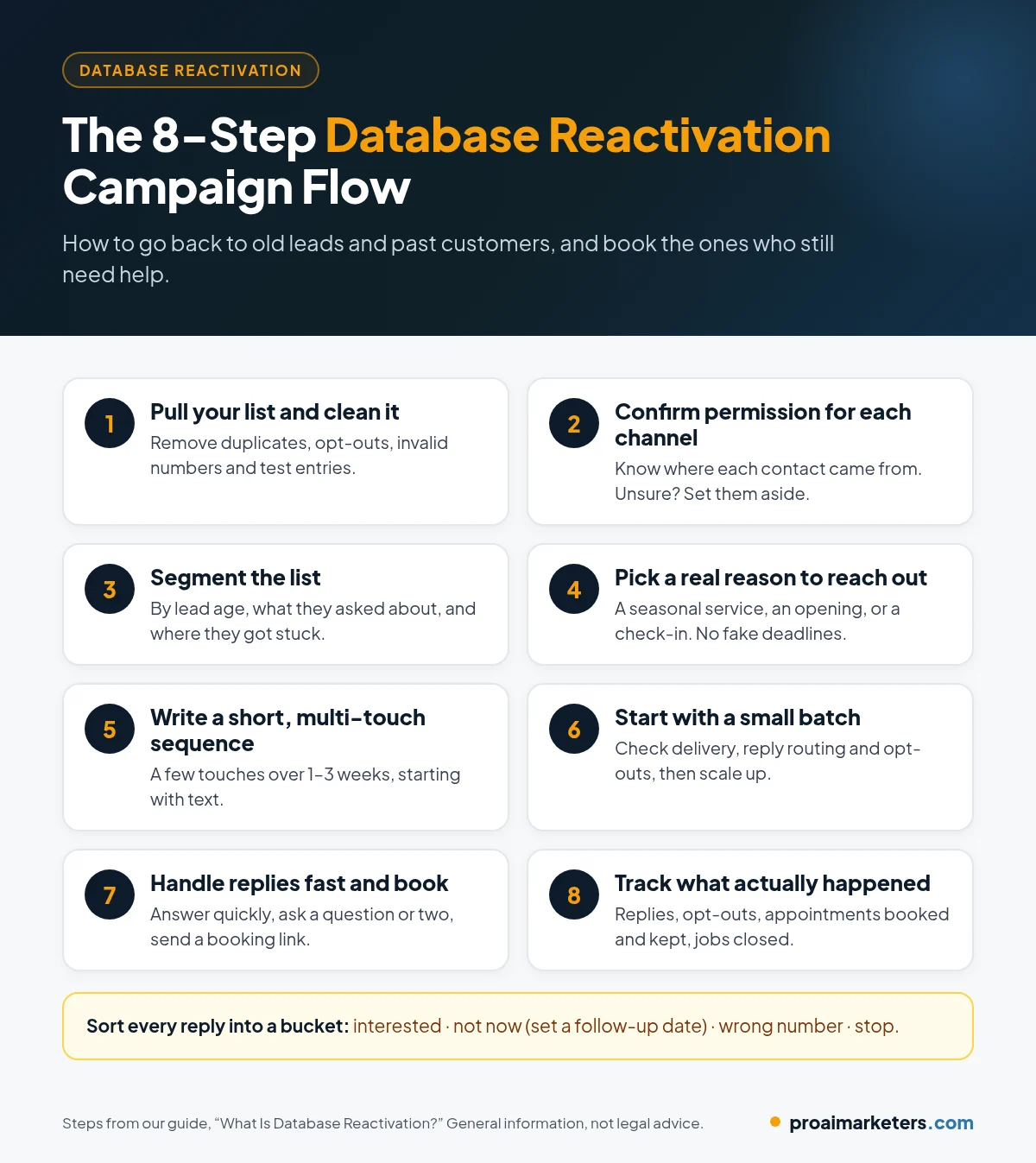
Step 1: Pull your list and clean it
Export contacts from your CRM, booking software and old spreadsheets. Then clean the list:
- Remove duplicates and anyone who has opted out or asked not to be contacted.
- Remove invalid numbers, fake names and test entries, and flag landlines (they can’t receive texts).
- For older lists, consider checking numbers against the FCC’s Reassigned Numbers Database, which flags numbers that were disconnected and may now belong to someone else.
Step 2: Confirm you have permission for each channel
Know where each contact came from and what they agreed to. Texting, calling and emailing each have their own permission rules. If you can’t tell whether a contact agreed to marketing messages, set them aside. (See the compliance section below.)
Step 3: Segment the list
Group contacts by:
- How old the lead is (for example, the last few months vs. more than a year ago)
- What they asked about (the service, product or job type)
- Where they got stuck (never booked, got a quote, no-showed, past customer)
Recent leads can get a direct “are you still looking?” message. Very old leads usually respond better to something useful or timely.
Step 4: Pick a real reason to reach out
Give people an honest reason to hear from you now: a seasonal service, an opening in the schedule, or a simple check-in on the project they asked about. Avoid fake deadlines.
Step 5: Write a short, multi-touch sequence
Most campaigns use a few touches over one to three weeks, starting with text because it’s easy to reply to. One example cadence:
| Example timing | Channel | Purpose |
|---|---|---|
| Day 1 | SMS | Short, personal re-opener with one easy question |
| Day 3 | More detail, a reason to act and a booking link | |
| Day 6 | SMS | Friendly follow-up for anyone who didn’t reply |
| Day 10–14 | SMS or call | Final “should I close your file?” check-in |
Anyone who replies should leave the automated sequence and get a real conversation.
Step 6: Start with a small batch
Send to a small segment first. Check that messages deliver, replies route correctly and opt-outs work. Then scale up.
Step 7: Handle replies fast and book the appointment
When someone replies “yes, still interested,” answer quickly, ask a qualifying question or two, and send a booking link. Sort every reply into a bucket: interested, not now (with a follow-up date), wrong number, or stop.
Step 8: Track what actually happened
Measure your own results, not someone else’s benchmarks: real replies, opt-outs and complaints, appointments booked and kept, and jobs closed. A rising opt-out rate is a signal to pause and fix your list or message.
Example Database Reactivation Messages
These are example templates, not proven scripts. Adapt them to your business, keep them truthful, and include opt-out language.
Example 1: First text to an old estimate (Day 1)
“Hi [First Name], it’s [Your Name] with [Business]. You asked us about [service] back in [month]. Is that still something you’re looking at? Reply STOP to opt out.”
Example 2: Follow-up email (Day 3)
Subject: Still thinking about your [service] project?
Hi [First Name], a while back you asked [Business] about [service]. If it’s still on your list, we have openings [timeframe] and can update your quote. Grab a time here: [booking link]. Already taken care of? Just let us know.
[Business name, address, unsubscribe link]
Example 3: Final check-in (Day 10–14)
“Hi [First Name], I don’t want to keep bugging you. Should I close out your [service] request, or would you still like help with it? Reply STOP to opt out.”
Example 4: Past customer, maintenance due
“Hi [First Name], it’s [Business]. It’s been about a year since your last [service]. Want us to get you on the schedule? Reply here or book: [link]. Reply STOP to opt out.”
Example 5: Real estate database reactivation
“Hi [First Name], it’s [Agent Name] with [Brokerage]. You were looking at homes in [area] a while back. Are you still thinking about buying or selling this year? Reply STOP to opt out.”
Which Businesses Is Database Reactivation a Good Fit For?
It works best for businesses that have collected leads for a while and sell something people need again or put off deciding on:
- Home service contractors (HVAC, plumbing, roofing, solar, remodeling, pest control): unaccepted estimates and seasonal maintenance
- Med spas, dental and other clinics: lapsed patients and consults that never booked
- Real estate agents: old portal leads, open house sign-ins and past clients
- Cleaning, salon, auto repair and other repeat-visit businesses: customers who haven’t been back
- Professional services: legal intakes and insurance quotes that went quiet
It’s probably not worth it yet if your list is tiny, you have no record of where contacts came from, or nobody can answer replies quickly.
Database Reactivation Compliance Basics (U.S.)
This section is general information, not legal advice. Rules vary by channel and state and change over time, so check your specific campaign with a qualified attorney before you launch.
- Consent for texts and calls. The Telephone Consumer Protection Act (TCPA) regulates marketing calls and texts. Marketing messages sent with automated systems, or calls using prerecorded or artificial voices, generally require prior express written consent. An old inquiry doesn’t automatically mean you have it.
- Honor opt-outs quickly. Under FCC rules, people can revoke consent by any reasonable means, including replying “stop,” “quit,” “end,” “revoke,” “opt out,” “cancel” or “unsubscribe” to a text, and businesses must honor opt-out requests within a reasonable time of no more than 10 business days (Federal Register, FCC final rule).
- AI voices count as “artificial.” In 2024 the FCC ruled that calls using AI-generated voices are “artificial” voice calls under the TCPA (FCC announcement). If your campaign uses AI voice calls, the same consent rules apply.
- Respect calling hours. Federal rules limit telephone solicitations to between 8 a.m. and 9 p.m. in the recipient’s local time, and some states are stricter. Schedule sends by the contact’s time zone.
- Register your texting. Business texts sent through software on local numbers need carrier registration (A2P 10DLC). Unregistered traffic is more likely to be filtered or blocked.
- Email has its own rules. The CAN-SPAM Act requires honest sender information and subject lines, a valid postal address and a working way to opt out, among other things. See the FTC’s CAN-SPAM compliance guide.
- State laws. Several states have their own, sometimes stricter, telemarketing and texting laws.
How AI Fits Into Database Reactivation
“AI database reactivation” (sometimes called a database reactivation bot) uses AI to handle the parts of a campaign that are hardest to do by hand:
- Personalizing messages based on what each contact asked about and when.
- Answering replies around the clock, so someone who texts back at 9 p.m. isn’t left waiting until tomorrow.
- Sorting replies into interested, not now, wrong number, or stop.
- Booking appointments on your calendar, often alongside an AI receptionist for callers.
- Handing off to a human for complaints, complex quotes or anything the AI shouldn’t guess at.
Good AI setups have guardrails: approved answers only, no made-up prices or promises, instant opt-out handling, and regular human review. AI makes follow-up fast and consistent. Your business still closes the job.
Common Database Reactivation Mistakes to Avoid
- Blasting the whole list at once. Start small, then scale.
- Skipping the cleanup. Dead numbers and opted-out contacts lead to complaints and filtering.
- Assuming old leads gave consent. Check first.
- Generic messages. “Special offer just for you!” reads like spam. Mention what they actually asked about.
- Fake urgency. Made-up deadlines hurt trust and can create legal risk.
- Slow replies. A reactivated lead who waits hours often goes quiet again.
- No tracking. Measure bookings and revenue, or you won’t know whether it worked.
Database Reactivation Software vs. a Done-for-You Service
Database reactivation software, usually a CRM with texting, email, automation and a calendar (HighLevel is a common choice), gives you the tools. You still have to clean the list, write messages, set up compliance and answer replies. A done-for-you service handles those steps, which suits owners who’d rather do the work than run campaigns.
Related guides: speed to lead and AI reputation management.
Frequently Asked Questions
What is database reactivation?
Database reactivation is a planned outreach campaign to the old leads and past customers already in your CRM or customer list. It uses text, email and sometimes calls to restart the conversation and book new appointments or jobs, without buying new leads.
How does a database reactivation campaign work?
You clean and segment your contact list, confirm you have permission to contact each person, and send a short sequence of messages, usually starting with a text. Replies are handled quickly by your team or an AI assistant, interested contacts are booked, and the results are tracked.
Is database reactivation legal?
It can be, when it’s done with proper consent and opt-out handling. Marketing texts and calls are regulated by the TCPA and state laws, and email is covered by the CAN-SPAM Act. Rules vary and change, so review your campaign with a qualified attorney before launching.
What is AI database reactivation?
AI database reactivation uses artificial intelligence to personalize outreach, answer replies at any hour, sort interested contacts from everyone else, and book appointments. It works best with approved answers, clear guardrails and a human reviewing conversations.
Turn Your Old Leads Into Booked Jobs
Your next customers might already be in your CRM. At Pro AI Marketers, we run database reactivation campaigns for service businesses across the U.S., connected to your CRM, calendar and AI follow-up. Pair it with missed call text back so new phone leads don’t go cold in the first place. Our missed call text back guide shows how to set it up and what to text.
Book a free strategy call. We’ll look at your existing list and tell you honestly whether a reactivation campaign makes sense.