
A homeowner DMs you on Instagram at 8:15 p.m. Another texts the number on your truck. A third fills out your website form and emails a follow-up. Three leads, three apps, and if you’re on a job site with one phone, at least one of those messages waits until tomorrow.
By then, many of them have already booked someone else.
An omnichannel AI inbox puts every inbound message in one place, alerts you instantly, and can reply on your behalf so no channel becomes a black hole. This guide explains what that looks like for a service business, how to set it up, and how to keep replies sounding like you.
Want it done for you? Our omni-channel AI responder unifies Facebook, Instagram, SMS, email and Google messages into one inbox, with AI or a VA ready to respond.
What Is an Omnichannel AI Inbox?
An omnichannel AI inbox is a single dashboard that collects messages from the places customers already reach you (text, Facebook, Instagram, email, Google Business messages, and often web chat) and lets you or an AI reply from that same screen. “Omnichannel” means the conversation stays connected across those channels. “AI inbox” means the system can draft or send replies, qualify the lead and push toward a booking without you jumping between apps.
It is different from:
- A single-channel autoresponder, which only covers one place (for example, SMS only).
- A social media notification feed, which alerts you but does not book jobs or sync to your CRM.
- A shared email inbox, which ignores DMs and texts entirely.
If you already care about speed to lead, an omnichannel inbox is how you keep that speed when leads arrive on five platforms instead of one.
Why Service Businesses Lose Leads Across Channels
Owners of cleaning companies, HVAC shops, med spas, notaries, locksmiths and similar trades usually don’t ignore leads on purpose. The problem is structural:
- Messages live in different apps. Facebook Messenger, Instagram DMs, SMS, Gmail and Google Business messages each have their own notification style and mute settings.
- After-hours traffic is real. People message when they think of the job: evenings, weekends, lunch breaks.
- Whoever answers first often wins. Customers comparing two or three local providers rarely wait a day for a reply.
- Context gets lost. A lead who DMs on Instagram and later texts your business line looks like two different people if the tools don’t talk to each other.
- Staff can’t live in five tabs. The person doing the work is often the same person who should be answering DMs.
An omnichannel setup fixes the structure: one place to see everything, one set of rules for how fast you reply, and one record in your CRM.
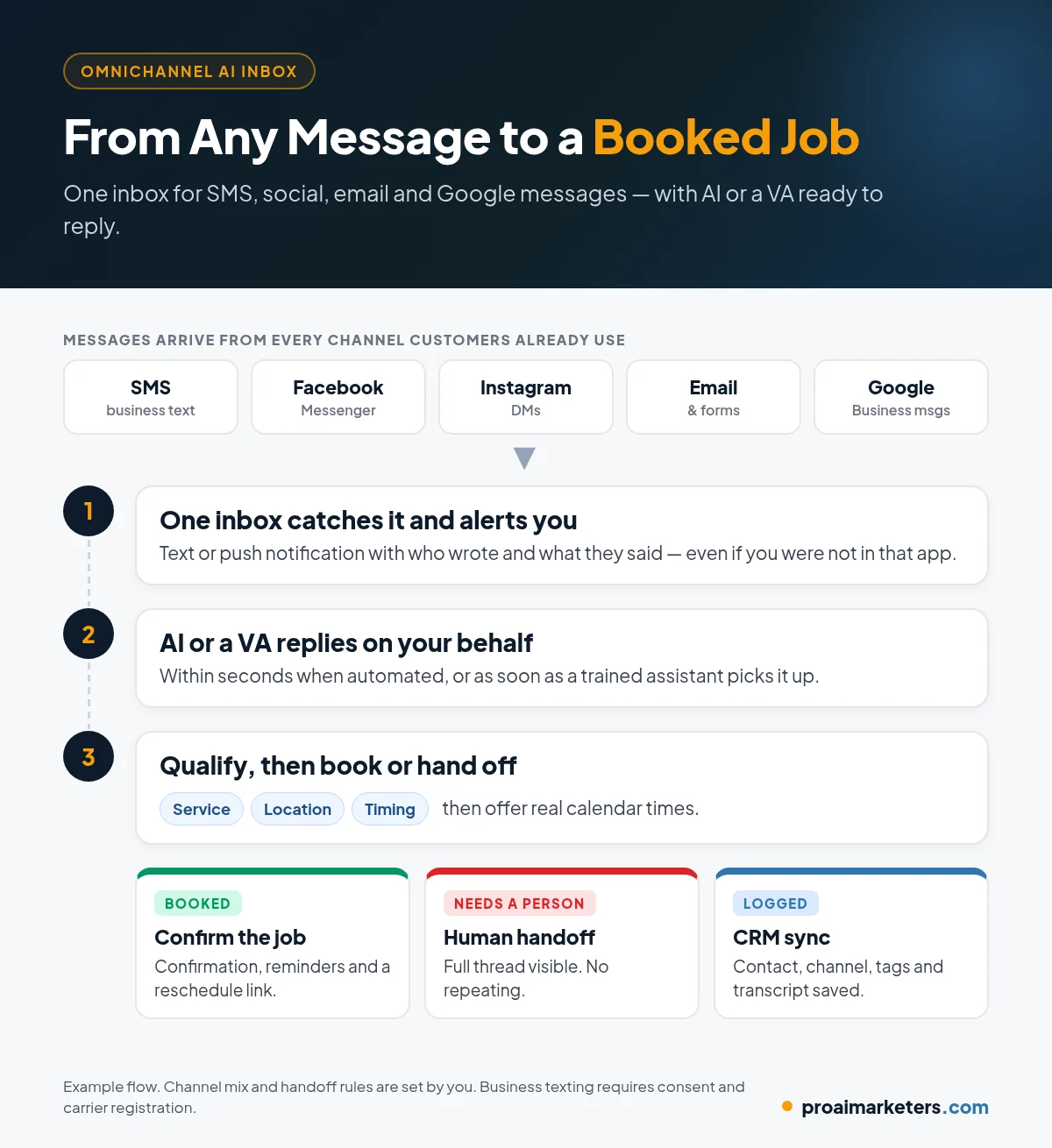
How an Omnichannel AI Inbox Works, Step by Step
Here is the typical flow for a service business:
- A message arrives on any connected channel. Facebook, Instagram, SMS, email, Google Business message or web chat.
- The inbox catches it and alerts you. You get a text or push notification with who wrote and what they said, even if you were not in that app.
- AI or a VA replies on your behalf. Within seconds when you want automation, or as soon as a trained assistant picks it up.
- The lead is qualified. Same basics you would ask on a call: service needed, location or ZIP, timing, and anything else that decides fit.
- The next step happens. Book a time with your appointment booking calendar, send pricing or a form, or escalate to a human.
- Everything is logged. Contact, channel, transcript and tags land in the CRM so the conversation does not restart from zero later.
Which Channels Should a Service Business Connect First?
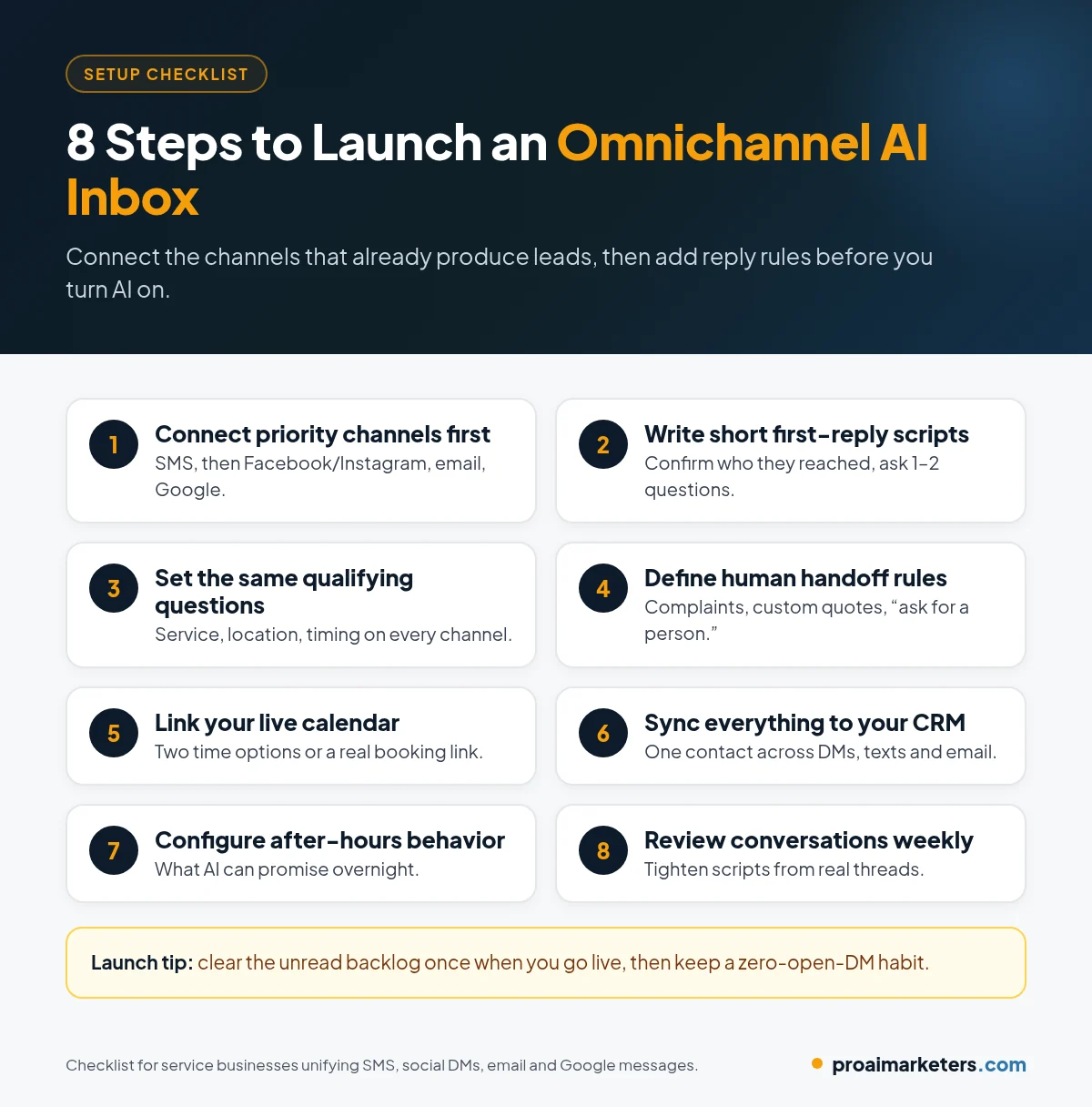
You do not need every platform on day one. Connect the channels where leads already show up, in this order for most local service businesses:
| Priority | Channel | Why it matters |
|---|---|---|
| 1 | SMS / business texting | Many callers prefer texting after a missed call; pairs with missed call text back |
| 2 | Facebook Messenger | Still a common way homeowners and local buyers ask about availability |
| 3 | Instagram DMs | Strong for visual trades, beauty, cleaning and home services that post work photos |
| 4 | Website forms and email | Form fills and “reply to this email” threads should not live in a separate silo |
| 5 | Google Business messages | People messaging you from Search or Maps while they are comparing options |
Add web chat, LinkedIn or TikTok only if you already get real inquiry volume there. Connecting empty channels just creates noise.
What Should the AI Say When It Replies?
Write the first reply the way your best team member texts. Keep it short, human and useful:
- Confirm who they reached. “Hi, this is [Business Name].”
- Acknowledge the ask. Mirror their words so they know you read the message.
- Ask one or two qualifying questions. Service, location, timing.
- Offer a clear next step. Two time options, or a booking link tied to your live calendar.
- Leave an escape hatch. “Prefer to talk to someone? Reply CALL and we’ll ring you.”
Sample first replies by channel
- SMS: “Hi, this is Bright Clean Co. Got your text about a move-out clean. What’s the ZIP and which day are you hoping for?”
- Instagram DM: “Thanks for reaching out. We do residential deep cleans in your area. Is this for a regular visit or a one-time job?”
- Facebook Messenger: “Happy to help. Are you looking for a quote or ready to book a time this week?”
- Email: Same substance, a bit more complete sentences, still under five lines for the first reply.
Save longer intake for after they book, or for a human follow-up. The goal of the first reply is to start a conversation and move toward a time on the calendar.
AI Reply vs. Human Handoff: Simple Rules
Automation should handle the repetitive questions. People should handle judgment. A practical split:
- AI can handle: hours, service area, whether you offer a service, booking a standard appointment, sending a link, collecting name and phone, after-hours acknowledgements.
- A human should take over: pricing disputes, complaints, custom commercial quotes, VIP or existing customers with an open issue, anyone who asks for a person, medical or legal intake that needs a licensed professional.
Put those rules in writing before you turn AI on. If your team cannot agree on when a person must step in, the inbox will either over-automate or stall.
How Does This Fit With Missed Calls and an AI Receptionist?
Think in layers:
- Phone calls can be answered and qualified by an AI receptionist, or recovered with missed call text back when nobody can pick up.
- Messages (SMS, social, email) belong in the omnichannel inbox so the same speed and qualifying questions apply.
- The CRM is the system of record so a lead who called yesterday and DMed today is one contact, not two.
You do not need every layer on day one. Many service businesses start with missed-call text-back, then add social and email into the same inbox once SMS is working.
Compliance and Trust Basics (Not Legal Advice)
Rules vary by channel and by state. Check with your provider and an attorney, and at minimum:
- SMS: Get appropriate consent for business texting, identify your business, and honor opt-outs promptly. Carrier registration (such as A2P 10DLC in the U.S.) is often required.
- Social platforms: Follow each platform’s messaging policies. Do not use scraped contact lists to cold-DM people who never contacted you.
- Email: For marketing email, follow CAN-SPAM (U.S.) and any applicable state rules; transactional booking confirmations are different from promotional blasts.
- Honesty: If AI is replying, do not pretend a named employee typed every word when that is not true. Be clear when a human takes over.
- Privacy: Store conversation history securely and limit who on your team can see sensitive details.
Inbound customer messages (someone writing you first) are a different situation from outbound cold outreach. For proactive outreach, see our guide on cold outreach for service businesses.
Common Mistakes to Avoid
- Connecting every app before you have reply rules. You will get more alerts and still answer slowly.
- “We got your message” with no next step. That is not a response. Ask a question or offer a time.
- Different scripts on every channel. Keep the substance the same; only the tone length changes.
- No human backup. After-hours AI still needs a morning review path for anything it could not finish.
- Inbox not tied to the calendar or CRM. If booked jobs live in someone’s head, the system fails under volume.
- Ignoring old unread threads. Clear the backlog once when you launch, then keep a zero-open-DM habit.
Frequently Asked Questions
What is an omnichannel AI inbox?
It is one inbox that collects customer messages from multiple channels (such as SMS, Facebook, Instagram, email and Google Business messages) and lets you or an AI reply from that same place, with conversations logged to your CRM.
Is an omnichannel inbox the same as a chatbot on my website?
No. A website chatbot is one channel. An omnichannel inbox covers the places customers already message you, including social DMs and texts, not only your site widget.
Will AI replies sound robotic?
Only if you write robotic scripts. Use short, natural language, answer the actual question, and hand off to a person when the conversation needs judgment.
Which channel should I connect first?
Start with the channel that already produces the most inquiries you are slow to answer. For many service businesses that is SMS (often paired with missed-call text-back), then Facebook or Instagram.
Do I still need an AI receptionist if I have an omnichannel inbox?
Often yes. The receptionist covers live and missed phone calls. The inbox covers written messages. Together they cover how customers actually reach a local business.
How fast should we reply to DMs and texts?
As close to instantly as you can for the first acknowledgement. Automation makes a useful first reply in seconds realistic, even when your team is on a job.
Stop Losing Jobs Buried in DMs
Customers will not hunt through your apps to find you. They message wherever is convenient and move on if nobody answers. An omnichannel AI inbox makes sure every one of those messages gets a fast, useful reply and a path to book.
At Pro AI Marketers, we set up omnichannel inboxes, AI responders and booking flows for service businesses nationwide.
Book a free strategy call. We’ll map where your leads actually write you today and which channels to connect first.