
Most local service businesses do good work and still have a thin review profile. Happy customers mean to leave a review and forget. The one unhappy customer remembers. And replying to every review, good or bad, falls to the bottom of a busy owner’s list.
AI reputation management fixes the parts that slip: asking every customer at the right moment, making it easy to leave a review, and helping you reply quickly and professionally. This guide covers how it works, how to get more Google reviews within Google’s rules, and how to respond to reviews with AI without sounding like a robot.
Want it done for you? Our AI reputation management service automates review requests, drafts replies for you to approve, and keeps every review in one dashboard.
What Is AI Reputation Management?
AI reputation management is the use of automation and AI to request reviews from real customers, monitor what people say about your business, and draft fast, on-brand replies that a human approves. It turns review management from an occasional chore into a steady, consistent system.
Reputation management vs. review management
Review management is the core: asking for reviews, tracking new ones and replying. Reputation management is broader and can also include keeping your business listings accurate, watching social mentions and showing reviews on your website. For most local service businesses, getting review management right is where nearly all the value is.
Why Do Reviews Matter So Much for Local Service Businesses?
Reviews do two jobs at once.
First, they influence where you show up. Google says local results are based mainly on relevance, distance and prominence, and that prominence takes into account information like how many reviews you have. In Google’s words, “More reviews and positive ratings can help your business’s local ranking” (Google Business Profile Help).
Second, they influence who calls. When a homeowner compares three plumbers on a map, your star rating, how recent your reviews are, and how you reply to criticism are often the only things they know about you.
How Does Reputation Automation Work, Step by Step?
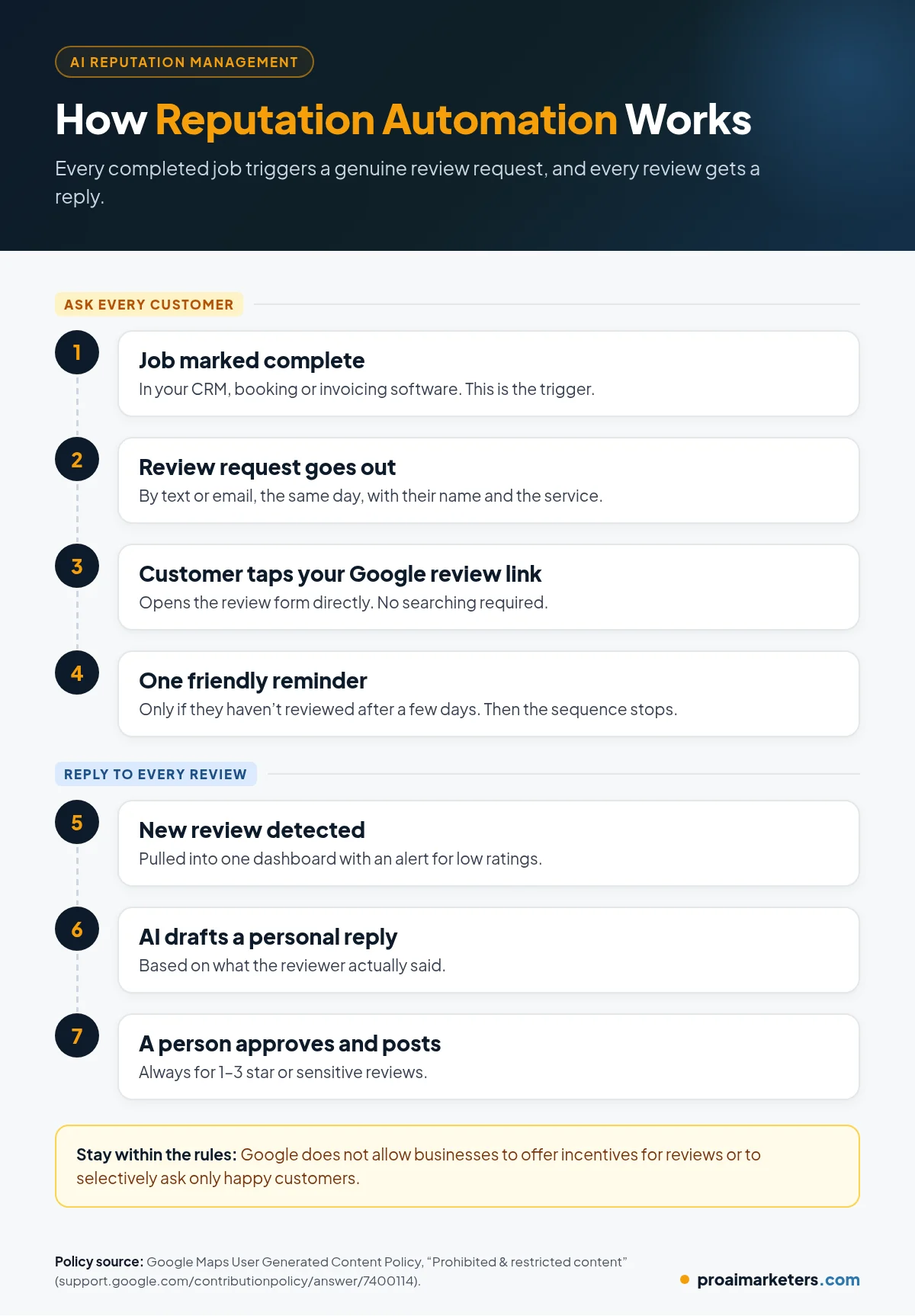
Reputation automation connects your job or appointment records to your review requests, so nobody has to remember to ask. A typical flow:
- The job is marked complete in your CRM, booking or invoicing software.
- A review request goes out automatically by text or email, usually the same day while the experience is fresh.
- The customer taps your Google review link, which opens the review form directly.
- If they don’t respond, one friendly reminder goes out a few days later. Then the sequence stops.
- New reviews are detected and pulled into one dashboard.
- AI drafts a reply based on what the reviewer actually said.
- A person approves the reply, always for negative or sensitive reviews, and it gets posted.
How Do You Get More Google Reviews the Right Way?
The businesses with the most reviews usually aren’t doing anything clever. They ask every customer, consistently, and they make it easy.
- Use your direct review link or QR code. Google lets you create a link or QR code that takes customers straight to your review form (Google: Tips to get more reviews). Put it in your text request, your email signature, your invoices and a card you leave behind.
- Ask at the right moment. Right after a job goes well is better than weeks later.
- Keep the request short and personal. Use their name and mention the service.
- Ask everyone, not just the happy ones. Google doesn’t allow businesses to “selectively solicit positive reviews from customers” (Google Maps content policy). Screening customers first and only sending happy ones to Google, often called review gating, breaks this rule.
- Train your team to mention it. A quick “you’ll get a text asking how we did” at the end of a visit helps a lot.
- Reply to the reviews you get. Customers notice businesses that respond.
What do Google and the FTC not allow?
Google’s policy prohibits offering incentives, like discounts or free services, in exchange for reviews or for removing a negative review. It also prohibits discouraging negative reviews, pressuring people to review while on your premises, asking for specific content, and setting staff review quotas (Google Maps content policy).
In the U.S., the Federal Trade Commission’s rule on consumer reviews and testimonials took effect on October 21, 2024. It bans fake reviews, including AI-generated reviews from people who don’t exist, buying positive or negative reviews, and suppressing reviews through groundless legal threats, intimidation or knowingly false accusations (FTC Q&A on the rule). AI should help you ask real customers and reply to real reviews. It should never write reviews.
Example review request messages
These are templates to adapt, not proven scripts.
Text after a service call:
“Hi [First Name], thanks for choosing [Business] today. If you have a minute, we’d really appreciate an honest review of your experience: [review link]”
Email after an appointment:
Subject: How did we do, [First Name]?
“Thanks again for trusting [Business] with your [service]. Your feedback helps us improve and helps neighbors find a business they can trust. You can leave a review here: [review link]”
One reminder, a few days later:
“Hi [First Name], just a quick reminder in case you missed our last message. An honest review would mean a lot: [review link]. Thanks either way!”
How Should You Respond to Reviews With AI?
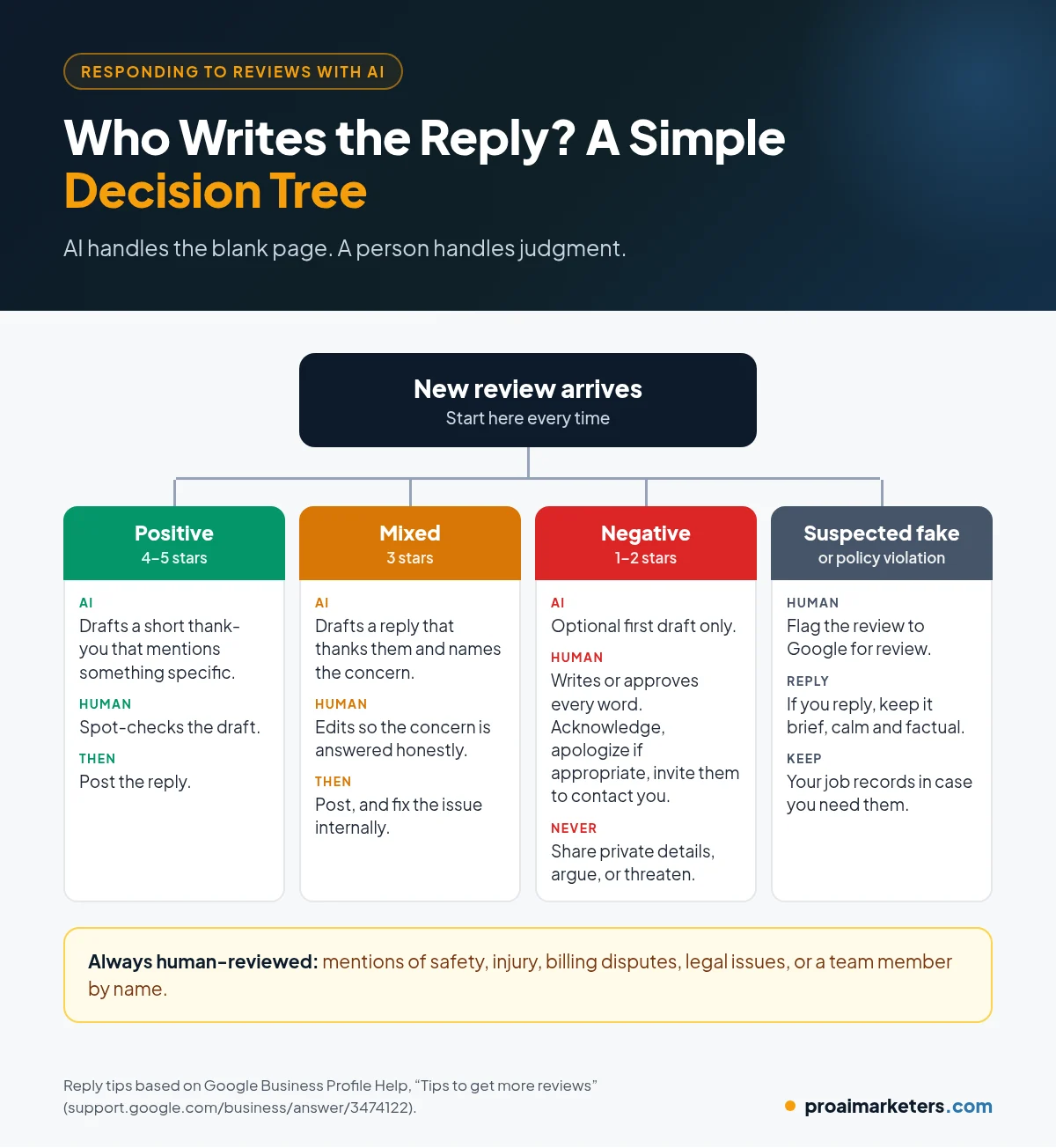
Responding to reviews with AI works best as a draft-and-approve process. The AI handles the blank page. A person handles judgment.
Google’s own tips for review replies are a good standard: keep replies professional, short and relevant, avoid sending the same “thank you” to everyone, and stay conversational rather than promotional (Google: Tips to get more reviews).
Replying to positive reviews
Thank the reviewer by name, mention something specific they said, and keep it to two or three sentences. For example:
“Thanks so much, Dana! We’re glad the new water heater was installed quickly and that Mike kept everything clean. We appreciate you trusting us with your home.”
Replying to negative reviews
Google recommends protecting the reviewer’s privacy, avoiding personal attacks, being honest about what went wrong, apologizing when appropriate, and inviting the customer to resolve the issue privately (Google: Tips to get more reviews). A solid reply:
“Hi Chris, I’m sorry your appointment was rescheduled twice. That’s not the experience we want anyone to have. I’d like to make this right. Please call me directly at [number] so we can sort it out.”
Never accuse a reviewer of lying or threaten legal action in a reply. Besides looking bad, false accusations and threats aimed at removing reviews are exactly what the FTC rule targets. If you believe a review breaks Google’s policies, you can flag it for Google to review (Google: Manage customer reviews).
Where should a human always stay in the loop?
- Any review of three stars or fewer
- Reviews that mention safety, injury, billing disputes or legal issues
- Reviews that mention an employee by name in a negative way
- Anything where the AI would need to guess at facts
What Should You Look for in Reputation Management Software?
- Automatic triggers from your CRM, calendar or invoicing tool
- Text and email requests with your direct Google review link
- One dashboard for new reviews across the sites you care about
- AI reply drafts that you can edit and approve
- Alerts for new negative reviews so you can respond quickly
- Opt-out handling for texts and emails
- Simple reporting on requests sent, reviews received and reply times
What Mistakes Should You Avoid?
- Asking only happy customers. That’s review gating, and Google doesn’t allow it.
- Offering discounts for reviews. Also not allowed, even for honest reviews.
- Auto-posting every AI reply. Generic or wrong replies do more harm than a short, real one.
- Sending too many reminders. One follow-up is enough.
- Arguing in public. Acknowledge, apologize where appropriate, and move the conversation offline.
How Do You Measure Whether It’s Working?
Track your own numbers each month, not someone else’s benchmarks:
- Review requests sent
- New reviews received
- Your average rating over time
- The share of reviews you replied to, and how quickly
- Calls and website clicks from your Google Business Profile
How Does Reputation Management Connect to the Rest of Your Marketing?
Reviews feed directly into your local SEO and Google Business Profile visibility. Review requests work best when they’re triggered from a CRM that knows when each job is done. If you also use missed call text back, the same system can send a review request after those jobs are completed. And with the reviewer’s permission, great feedback can become social media content.
Related guides: local SEO for service businesses and speed to lead.
Frequently Asked Questions
What is AI reputation management?
AI reputation management uses automation and AI to request reviews from real customers, monitor new reviews, and draft fast, on-brand replies that a person approves before they are posted.
How can I get more Google reviews for my business?
Ask every customer soon after the job, send your direct Google review link by text or email, make the request short and personal, and send one reminder. Do not offer incentives or only ask happy customers.
Is it okay to use AI to respond to Google reviews?
Yes, as long as the replies are accurate, personal and approved by a person, especially for negative reviews. AI should draft replies to real reviews. It should never write reviews.
Can I offer a discount in exchange for a review?
No. Google’s policy prohibits offering incentives such as discounts, free goods or services in exchange for reviews, and the FTC rule bans buying reviews that express a particular sentiment.
How should I respond to a negative review?
Respond calmly and quickly, acknowledge the problem, apologize when appropriate, and invite the customer to contact you directly. Never share private details or accuse the reviewer of lying.
Build a Reputation That Matches Your Work
You already do good work. A simple, consistent system makes sure more customers say so, and that every reviewer hears back from you.
At Pro AI Marketers, we set up AI reputation management for local service businesses across the U.S., connected to your CRM, your review link and your team’s approval process.
Book a free strategy call. We’ll look at your current reviews and show you where a review system can help.